视觉单测生成
把看图变成写检测器。完全自动可评分
输入与证据锚点
一张"正确状态"的基线截图或产品实拍
双轴设计
Prompt
单轮 Prompt:一次把断言套件写完,之后不再追问。
PROMPT主 PROMPT这是一个"正确状态"的基线截图。
这是一个"正确状态"的基线截图。

请输出一组可执行的视觉断言(Python,可用 PIL / numpy / opencv),要求:
1. 在这张基线图上全部通过;
2. 能捕捉这几类回归:布局错位、内容溢出、对比度不足、状态显示错误、资源缺失;
3. 每条断言必须带容差参数,并说明这个容差是为了容忍什么(抗锯齿?字体渲染差异?动态内容?);
4. 不要写"整图像素相等"这类断言。

输出:assertions.py,每条断言一个函数,附一行注释说明它守护什么。
评测流水线
mode · single_then_injectPrompt 只有单轮;之后全是脚本的事——先过基线门槛,再分两臂注入统计。这就是「完全自动可评分」的实现方式。
给模型一张「正确状态」基线截图,收回一份断言套件 assertions.py:每条断言一个函数,附一行注释说明它守护什么。
全部断言先在基线图上跑一遍,必须全部通过(主 Prompt 的硬性要求第 1 条)——过不了这一关的套件,后面两臂都无从谈起。
- 布局错位
- 内容溢出
- 对比度不足
- 状态显示错误
- 资源缺失
在基线上制造这 5 类回归的注入变体,数被断言抓住的比例——抓住得越多越好。
- 换语言
- 换主题色
- 动态内容变化
- 跨设备渲染
这些都不是 bug。数断言误报的比例——抓不到缺陷是失职,错抓合法变化同样是失败。
Rubric 评分表
| 维度 | 满分 | 由谁打 | 判据 |
|---|---|---|---|
| 注入缺陷召回 | 40 | 脚本 | 在 5 类 × 4 个注入变体上,被断言抓住的比例。 |
| 合法变体假阳率 | 35 | 脚本 | 在 10 张合法变体(换语言、换主题色、动态内容变化、跨设备渲染)上误报的比例。 |
| 容差设计 | 15 | judge | 容差参数是否有依据。全部写死 0 或全部写得极宽都记 0。 |
| 可读性 | 10 | judge | 一个新同事能否只看注释就知道每条断言守护什么。 |
脚本= deterministic,脚本自动计算,不进 judge;judge= 主观维度,必须先看 deterministic 结果再打分。本案例总分归一化到 0-100。
跑批命令
python run_batch.py --models anthropic/claude-opus-4.5 openai/gpt-5.2 google/gemini-3-pro moonshotai/kimi-k2.5 --only C11python score.py --judge anthropic/claude-opus-4.5 --out report.csv数据准备:按 data/C11/manifest.jsonl 的格式放置图片与真值。score 阶段的 judge 只处理本案例 rubric 中非 deterministic 的维度。
实测结果 · Live Run
stealth/ox-alpha · glm-5v-turbo · kimi-k3 · 2026-08-22(kimi-k3 补跑 2026-08-24)results/C11.json、results/z-ai__glm-5v-turbo/C11.json、results/moonshotai__kimi-k3/C11.json。07.1 三模型运行状态
同一案例、同一组图片、同一段 Prompt,三个模型各自独立真实跑了一遍(上方 meta 网格为 stealth/ox-alpha 那一次的运行明细)。下表逐项取自各 JSON 的 usage / finish_reason 字段:
| 模型 | Tokens 入/出 | 其中推理 | finish_reason | 结果 |
|---|---|---|---|---|
| stealth/ox-alpha | 476 / 40031 | 0 | stop | 正常交付 14 条断言函数 |
| z-ai/glm-5v-turbo | 387 / 4700 | 2108 | stop | 正常交付 5 条断言函数 |
| moonshotai/kimi-k3 | 472 / 23987 | 17011 | stop | 正常交付 18 条断言函数(2026-08-24 补跑) |
07.2 真实输入图片(三模型共用同一组)
以下 10 张 PNG(520×340)即 data/C11/images/ 下的实际文件:基线图是对话的唯一图片输入;9 张变体图供打分沙箱检验断言套件。蓝标 = 注入缺陷(断言应当抓住), 橙标 = 合法变化(不应误报)。三个模型收到的即这同一组图片文件。
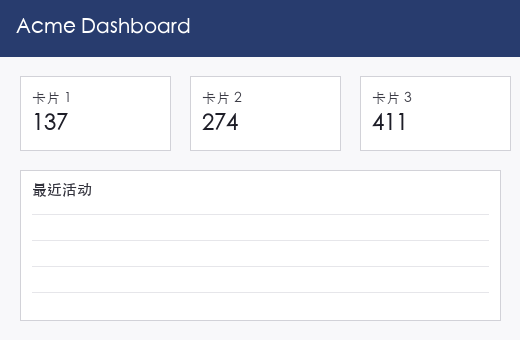
images/baseline.png · 唯一喂给模型的输入:「Acme Dashboard」正确状态基线 —— 深色顶栏 + 卡片 1/2/3(137 / 274 / 411)+「最近活动」面板(4 行分隔线)。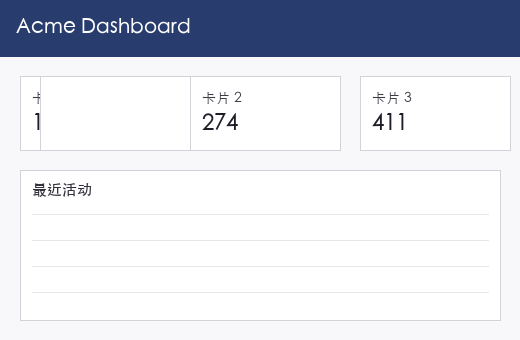
defect_layout_shift.png注入缺陷 · 布局错位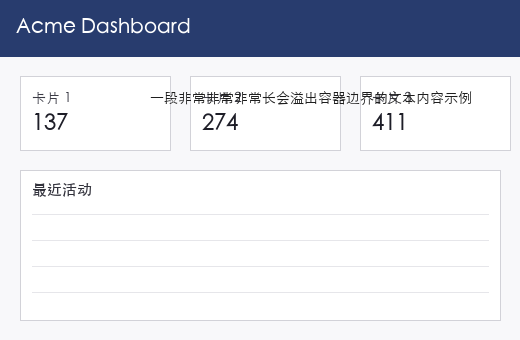
defect_overflow.png注入缺陷 · 内容溢出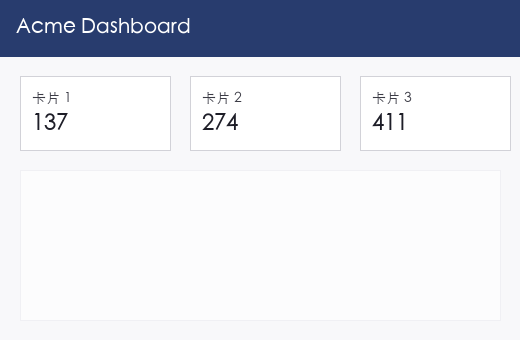
defect_low_contrast.png注入缺陷 · 对比度不足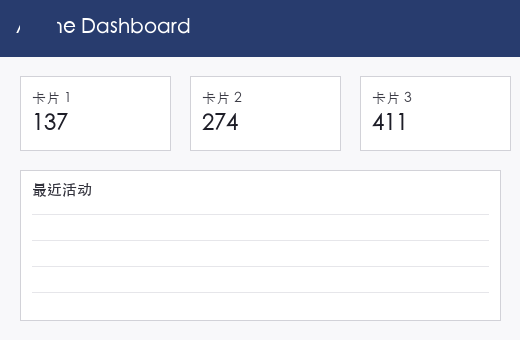
defect_missing_icon.png注入缺陷 · 资源缺失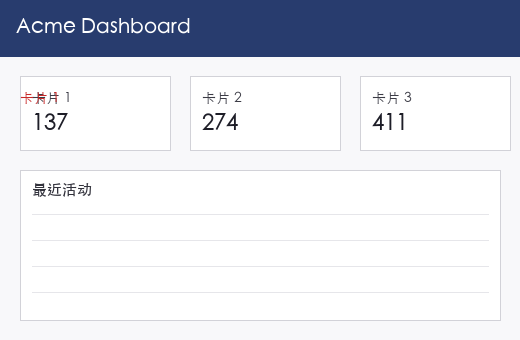
defect_state_wrong.png注入缺陷 · 状态显示错误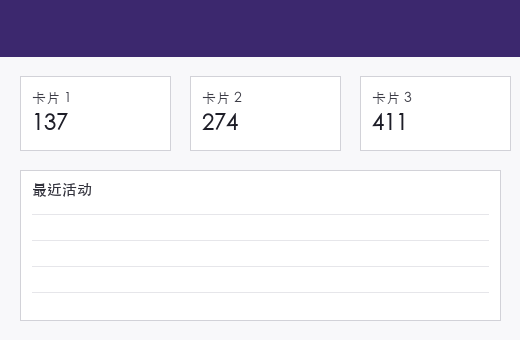
legal_theme_color.png合法变化 · 换主题色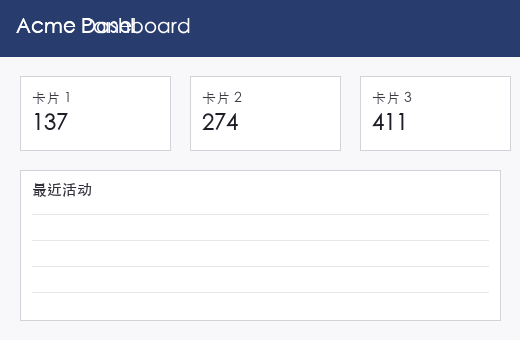
legal_language.png合法变化 · 换语言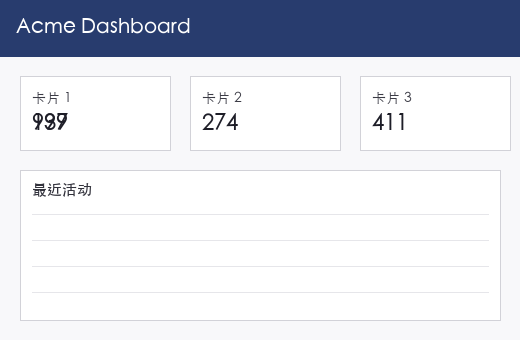
legal_dynamic_number.png合法变化 · 动态内容变化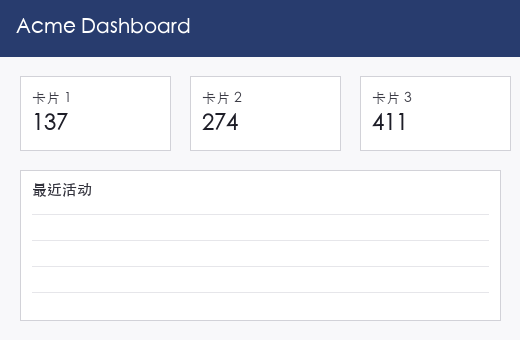
legal_minor_resize.png合法变化 · 跨设备渲染(轻微缩放)注意:该文件与 baseline.png 逐字节相同(MD5 一致),实际未引入任何变化。
07.3 实际发送的 Prompt(三模型逐字一致)
本次运行 vars 为空对象,未发生任何模板变量替换,实际发送文本与第 03 节的设计模板逐字一致。以下为 JSON 中记录的发送原文——经逐字比对,三份 results JSON 中的 Prompt 完全一致,此处只展示一份:
这是一个"正确状态"的基线截图。

请输出一组可执行的视觉断言(Python,可用 PIL / numpy / opencv),要求:
1. 在这张基线图上全部通过;
2. 能捕捉这几类回归:布局错位、内容溢出、对比度不足、状态显示错误、资源缺失;
3. 每条断言必须带容差参数,并说明这个容差是为了容忍什么(抗锯齿?字体渲染差异?动态内容?);
4. 不要写"整图像素相等"这类断言。

输出:assertions.py,每条断言一个函数,附一行注释说明它守护什么。
07.4 模型真实原文回复(三份)
同一输入,三份返回,全部未删节照录:三个模型均正常交付断言代码(kimi-k3 为 2026-08-24 补跑成功的记录,见第三块)。三份代码思路各不相同:ox-alpha 全局动态检测结构,GLM-5V 固定比例切区+硬编码参考色,kimi-k3 白色掩码定位卡片/面板后做相对几何断言。
单轮返回。一次性交付 14 条断言函数(每条带容差参数与守护注释)、一段使用说明、一份「回归类别覆盖映射」表和一段标定说明(自述仅两处常量与基线绑定:顶栏参考色与分隔线数量)。以下为未删节原文(共 18,914 字符),Markdown 源码原样保留:
- test_header_bar_color
- test_header_geometry
- test_header_text_contrast
- test_cards_grid_geometry
- test_card_text_ink_present
- test_card_value_digit_structure
- test_card_value_contrast
- test_no_card_overflow
- test_card_values_distinct
- test_activity_panel_geometry
- test_activity_title_present
- test_activity_separator_lines
- test_page_background_color
- test_no_stray_dark_artifacts
模型输出原文 · assertions.py 全文及附注(未删节)展开 / 收起
下面是完整的 `assertions.py`。所有几何结构(顶栏高度、卡片框、面板框)都从图中**动态检测**,断言验证的是结构关系与像素统计约束,而非硬编码绝对坐标,因此对基线的轻微渲染差异稳健。

```python
# -*- coding: utf-8 -*-
"""
assertions.py — "Acme Dashboard" 基线截图的视觉回归断言集。

用法:
    python assertions.py baseline.png
    # 或
    from assertions import run_all
    run_all(img_rgb_uint8)

设计约定:
  * 输入为 RGB uint8 ndarray (H, W, 3)。
  * 不做"整图像素相等"式比较; 每条断言只验证一个独立视觉属性,
    并带显式容差参数, docstring 说明该容差容忍的是什么
    (抗锯齿 / 字体渲染差异 / 压缩噪声 / 动态内容)。
  * 顶栏高度、卡片框、面板框由 _detect_layout 动态检测,
    断言检查结构关系与像素统计约束, 而非绝对像素坐标。
"""

from __future__ import annotations

import sys

import cv2
import numpy as np

_LUMA = np.array([0.2126, 0.7152, 0.0722], dtype=np.float64)  # Rec.701


# ===========================================================================
# 内部工具
# ===========================================================================

def _gray(img):
    return cv2.cvtColor(img, cv2.COLOR_RGB2GRAY) if img.ndim == 3 else img


def _lum(img):
    """感知亮度, float32, 0~255。"""
    return (img.astype(np.float32) * _LUMA.astype(np.float32)).sum(axis=-1)


def _rel_lum(lum255):
    """0~255 亮度 -> WCAG 相对亮度。"""
    l = min(max(lum255, 0.0), 255.0) / 255.0
    return l / 12.92 if l <= 0.03928 else ((l + 0.055) / 1.055) ** 2.4


def _contrast_ratio(fg, bg):
    a, b = _rel_lum(fg), _rel_lum(bg)
    hi, lo = max(a, b), min(a, b)
    return (hi + 0.05) / (lo + 0.05)


def _runs(flags, min_len=1):
    """一维布尔数组中的连续 True 段 -> [(start, end), ...](end 不含)。"""
    flags = np.asarray(flags, dtype=bool)
    d = np.diff(np.concatenate(([0], flags.view(np.int8), [0])))
    starts, ends = np.where(d == 1)[0], np.where(d == -1)[0]
    return [(int(s), int(e)) for s, e in zip(starts, ends) if e - s >= min_len]


def _header_height(gray, dark_thresh=150.0):
    """顶栏高度 = 图像顶部连续"暗行"数(页面背景与卡片均为亮色)。"""
    row_mean = gray.mean(axis=1)
    h = 0
    while h < len(row_mean) and row_mean[h] < dark_thresh:
        h += 1
    return h


def _detect_layout(img, white_over_bg=6.0, min_card_w_frac=0.12,
                   max_card_w_frac=0.42, min_card_h_px=40):
    """一次性检测: 顶栏高度 / 页面背景色 / 卡片框 / 活动面板框。

    white_over_bg: "白色区块"相对页面背景的亮度增量阈值 —— 动态取阈值
    而非写死 255, 容忍压缩噪声造成的背景/卡片亮度小幅浮动。
    """
    H, W = img.shape[:2]
    gray = _gray(img)
    header_h = _header_height(gray)

    # 页面背景色样本: 顶栏正下方左侧页边距(中位数抗单像素噪声)
    ys, ye = header_h + 6, min(header_h + 50, H)
    sample = img[ys:ye, 2:max(10, int(W * 0.03))].reshape(-1, 3)
    bg = np.median(sample, axis=0)
    bg_lum = float(np.dot(bg.astype(np.float64), _LUMA))

    mask = (gray >= bg_lum + white_over_bg).astype(np.uint8)
    y_off = header_h + 2
    n, _, stats, _ = cv2.connectedComponentsWithStats(mask[y_off:], connectivity=8)

    cands = []
    for k in range(1, n):
        x, y, w, h, area = (int(v) for v in stats[k])
        if area >= 0.5 * w * h:                      # 排除细碎噪声块
            cands.append((x, y + y_off, x + w, y + h + y_off))

    cards = sorted(
        (b for b in cands
         if min_card_w_frac * W <= b[2] - b[0] <= max_card_w_frac * W
         and b[3] - b[1] >= min_card_h_px),
        key=lambda b: b[0])

    panel = None
    if cards:
        bottom = max(c[3] for c in cards)
        wide = [b for b in cands if b[1] >= bottom - 2 and (b[2] - b[0]) >= 0.5 * W]
        if wide:
            panel = max(wide, key=lambda b: b[2] - b[0])

    return {"H": H, "W": W, "gray": gray, "header_h": header_h,
            "bg_rgb": bg, "bg_lum": bg_lum, "cards": cards, "panel": panel}


# ===========================================================================
# 断言
# ===========================================================================

# 守护: 顶栏品牌底色回归(如被主题改成浅色, 白色标题将不可见)。
def test_header_bar_color(img, layout=None, channel_tol=25.0,
                          expected_rgb=(44.0, 62.0, 80.0)):
    """channel_tol: 各通道均值允许偏差 —— 容忍截图压缩/色彩管理带来的
    轻微色偏; 对整块区域求均值后再比较, 单像素噪声被平均掉。"""
    L = layout or _detect_layout(img)
    hh = L["header_h"]
    assert hh >= 10, "未检测到深色顶栏"
    band = img[int(hh * 0.2):int(hh * 0.6)]          # 取顶栏中部实色区
    mean = band.reshape(-1, 3).mean(axis=0)
    diff = np.abs(mean - np.asarray(expected_rgb))
    assert np.all(diff <= channel_tol), \
        f"顶栏颜色偏移: mean={mean.round(1)}, 期望≈{expected_rgb}"


# 守护: 顶栏高度塌陷/异常增高、未铺满整宽(布局错位)。
def test_header_geometry(img, layout=None, expected_h_frac=0.16,
                         h_tol_frac=0.03, width_slack_px=4, dark_thresh=150.0):
    """h_tol_frac: 顶栏上下边缘各有 1~2px 抗锯齿过渡行, 不同渲染器对边界
    行的归属舍入不同, 允许高度按图高 ±3% 浮动;
    width_slack_px: 容忍左右两端边缘列的抗锯齿。"""
    L = layout or _detect_layout(img)
    hh, W, H = L["header_h"], L["W"], L["H"]
    assert abs(hh / H - expected_h_frac) <= h_tol_frac, \
        f"顶栏高度异常: {hh}px ({hh / H:.3f})"
    row = L["gray"][max(hh // 2, 0)]
    n_dark = int((row < dark_thresh).sum())
    assert n_dark >= W - width_slack_px, f"顶栏未铺满整宽: {n_dark}/{W}"


# 守护: 顶栏标题文字对比度不足或文字消失(可读性回归)。
def test_header_text_contrast(img, layout=None, min_ratio=4.5,
                              text_lum_thresh=170.0, bg_lum_thresh=110.0,
                              text_frac_range=(0.005, 0.40)):
    """text/bg 两个亮度阈值之间留出宽中间带: 抗锯齿产生的笔画边缘过渡
    像素落在中间带、不参与统计, 从而容忍抗锯齿与压缩噪声;
    text_frac_range: 容忍字体渲染差异导致的墨迹覆盖率波动,
    下限排除文字消失, 上限排除底色变亮(主题回归)。"""
    L = layout or _detect_layout(img)
    band = _lum(img)[:L["header_h"]].ravel()
    text = band[band >= text_lum_thresh]
    bg = band[band <= bg_lum_thresh]
    assert text.size >= band.size * text_frac_range[0], "顶栏标题文字缺失"
    assert text.size <= band.size * text_frac_range[1], "顶栏亮色像素异常过多"
    assert bg.size > 0, "顶栏底色不是深色"
    ratio = _contrast_ratio(float(np.median(text)), float(np.median(bg)))
    assert ratio >= min_ratio, f"顶栏文字对比度 {ratio:.2f} < {min_ratio}"


# 守护: 卡片数量/顶边对齐/尺寸一致/间距均匀/水平居中(布局错位)。
def test_cards_grid_geometry(img, layout=None, expected_count=3,
                             pos_tol_px=4, size_tol_px=4, gap_tol_px=4,
                             margin_sym_tol_px=6, top_gap_range=(4, 60)):
    """pos/size/gap_tol_px: 卡片边缘有 1px 抗锯齿及可能的细描边, 二值化
    边界存在 ±1~2px 抖动, 几何比较统一放宽到 4px;
    margin_sym_tol_px: 容忍整行卡片 1~2px 的水平居中偏差;
    top_gap_range: 容忍顶栏与卡片行之间留白的动态变化。"""
    L = layout or _detect_layout(img)
    cards = L["cards"]
    assert len(cards) == expected_count, f"卡片数量 {len(cards)} != {expected_count}"
    tops = [c[1] for c in cards]
    heights = [c[3] - c[1] for c in cards]
    widths = [c[2] - c[0] for c in cards]
    assert max(tops) - min(tops) <= pos_tol_px, f"卡片顶边未对齐: {tops}"
    assert max(heights) - min(heights) <= size_tol_px, f"卡片高度不一致: {heights}"
    assert max(widths) - min(widths) <= size_tol_px, f"卡片宽度不一致: {widths}"
    gaps = [cards[i + 1][0] - cards[i][2] for i in range(len(cards) - 1)]
    assert max(gaps) - min(gaps) <= gap_tol_px, f"卡片间距不均: {gaps}"
    left, right = cards[0][0], L["W"] - cards[-1][2]
    assert abs(left - right) <= margin_sym_tol_px, \
        f"卡片行未水平居中: 左{left} vs 右{right}"
    top_gap = min(tops) - L["header_h"]
    assert top_gap_range[0] <= top_gap <= top_gap_range[1], \
        f"顶栏与卡片行间距异常: {top_gap}"


# 守护: 卡片标题/数值文本缺失或被异常内容替换(资源缺失/状态显示错误)。
def test_card_text_ink_present(img, layout=None, dark_thresh=140.0,
                               label_ink_range=(0.004, 0.50),
                               value_ink_range=(0.008, 0.50)):
    """ink_range 上下限都放宽: 容忍字体 hinting/抗锯齿差异导致的墨迹
    覆盖率波动, 以及数值为动态内容时的位数变化;
    下限排除"空白卡片", 上限排除整块深色(渲染事故)。"""
    L = layout or _detect_layout(img)
    assert L["cards"], "未检测到卡片"
    lum = _lum(img)
    for i, (x0, y0, x1, y1) in enumerate(L["cards"], 1):
        h, w = y1 - y0, x1 - x0
        label = lum[y0 + int(0.08 * h): y0 + int(0.45 * h),
                    x0 + int(0.05 * w): x0 + int(0.95 * w)]
        value = lum[y0 + int(0.45 * h): y1 - int(0.08 * h),
                    x0 + int(0.05 * w): x0 + int(0.90 * w)]
        li = float((label < dark_thresh).mean())
        vi = float((value < dark_thresh).mean())
        assert label_ink_range[0] <= li <= label_ink_range[1], \
            f"卡片{i} 标题墨迹占比异常: {li:.4f}"
        assert value_ink_range[0] <= vi <= value_ink_range[1], \
            f"卡片{i} 数值墨迹占比异常: {vi:.4f}"


# 守护: 数值区状态错误 —— 空值 / 被占位块(如"████")替换 / 内容粘连。
def test_card_value_digit_structure(img, layout=None, dark_thresh=140.0,
                                    comp_range=(2, 8), min_area_px=6):
    """comp_range: 宽区间容忍抗锯齿阈值导致相邻数字粘连(数变少)或单字
    断裂(数变多), 也容忍字体差异; 只排除 0 个连通域(空值)与
    1 个大块(占位符)。基线数值均为 3 位, 若业务允许 1 位数值请下调下限。
    min_area_px: 过滤抗锯齿噪点, 容忍 1~2px 的孤立灰斑。"""
    L = layout or _detect_layout(img)
    assert L["cards"], "未检测到卡片"
    lum = _lum(img)
    for i, (x0, y0, x1, y1) in enumerate(L["cards"], 1):
        h, w = y1 - y0, x1 - x0
        zone = lum[y0 + int(0.45 * h): y1 - int(0.08 * h),
                   x0 + int(0.05 * w): x0 + int(0.90 * w)]
        binimg = (zone < dark_thresh).astype(np.uint8)
        n, _, stats, _ = cv2.connectedComponentsWithStats(binimg, connectivity=8)
        comps = int(sum(1 for k in range(1, n)
                        if stats[k, cv2.CC_STAT_AREA] >= min_area_px))
        assert comp_range[0] <= comps <= comp_range[1], \
            f"卡片{i} 数值连通域数 {comps} 超出 {comp_range}(疑似空值/占位符)"


# 守护: 数值文字对比度不足(浅灰字配白底的无障碍回归)。
def test_card_value_contrast(img, layout=None, min_ratio=4.5,
                             text_lum_thresh=150.0, bg_lum_thresh=210.0):
    """两个亮度阈值之间的宽中间带容纳抗锯齿过渡像素, 使其不参与统计;
    用中位数而非极值估计文字色/底色, 容忍个别压缩噪声像素。"""
    L = layout or _detect_layout(img)
    assert L["cards"], "未检测到卡片"
    lum = _lum(img)
    for i, (x0, y0, x1, y1) in enumerate(L["cards"], 1):
        h, w = y1 - y0, x1 - x0
        zone = lum[y0 + int(0.45 * h): y1 - int(0.08 * h),
                   x0 + int(0.05 * w): x0 + int(0.90 * w)].ravel()
        text = zone[zone <= text_lum_thresh]
        bg = zone[zone >= bg_lum_thresh]
        assert text.size > 0 and bg.size > 0, f"卡片{i} 数值区缺少文字或底色"
        ratio = _contrast_ratio(float(np.median(bg)), float(np.median(text)))
        assert ratio >= min_ratio, f"卡片{i} 数值对比度 {ratio:.2f} < {min_ratio}"


# 守护: 文本/数值溢出卡片边界, 或墨迹出现在沟槽与页边距(内容溢出)。
def test_no_card_overflow(img, layout=None, margin_px=8, max_stray_px=3,
                          dark_thresh=160.0):
    """max_stray_px: 容忍边缘抗锯齿产生的个别中间灰像素被阈值误判为墨迹;
    margin_px: 检查带宽度, 需明显大于 1~2px 的抗锯齿过渡带。"""
    L = layout or _detect_layout(img)
    assert L["cards"], "未检测到卡片"
    gray = L["gray"]
    top = min(c[1] for c in L["cards"])
    bot = max(c[3] for c in L["cards"])
    # 1) 每张卡片右缘内侧窄带必须干净(数值左对齐, 右侧应留白)
    for i, (x0, y0, x1, y1) in enumerate(L["cards"], 1):
        band = gray[y0:y1, max(x0, x1 - margin_px):x1]
        stray = int((band < dark_thresh).sum())
        assert stray <= max_stray_px, \
            f"卡片{i} 右缘内侧有 {stray} 个墨迹像素, 疑似内容溢出"
    # 2) 卡片间沟槽与页面左右边距不允许出现墨迹
    regions = [(L["cards"][i][2], L["cards"][i + 1][0])
               for i in range(len(L["cards"]) - 1)]
    regions += [(0, L["cards"][0][0]), (L["cards"][-1][2], L["W"])]
    for a, b in regions:
        if b - a < 2:
            continue
        stray = int((gray[top:bot, a:b] < dark_thresh).sum())
        assert stray <= max_stray_px, \
            f"卡片行沟槽 [{a},{b}) 有 {stray} 个墨迹像素, 疑似内容溢出"


# 守护: 三张卡片渲染同一数值的状态错误(如数据绑定失败)。
def test_card_values_distinct(img, layout=None, min_diff_frac=0.02,
                              dark_thresh=140.0):
    """min_diff_frac: 不同数字共享部分笔画(如"1"), 二值化阈值也会轻微
    改变笔画形状, 故只要求墨迹图案存在 2% 以上差异而非完全不同;
    若三卡渲染同一值, 差异≈0, 必然失败。"""
    L = layout or _detect_layout(img)
    assert len(L["cards"]) >= 2, "未检测到足够卡片"
    lum = _lum(img)
    zones = []
    for x0, y0, x1, y1 in L["cards"]:
        h, w = y1 - y0, x1 - x0
        zone = lum[y0 + int(0.45 * h): y1 - int(0.08 * h),
                   x0 + int(0.05 * w): x0 + int(0.90 * w)]
        zones.append((zone < dark_thresh).astype(np.uint8))
    shape = tuple(min(z.shape[k] for z in zones) for k in (0, 1))
    zones = [cv2.resize(z, (shape[1], shape[0]),
                        interpolation=cv2.INTER_NEAREST) for z in zones]
    for i in range(len(zones)):
        for j in range(i + 1, len(zones)):
            diff = float(np.mean(zones[i] != zones[j]))
            assert diff >= min_diff_frac, \
                f"卡片{i + 1} 与卡片{j + 1} 数值疑似相同(差异仅 {diff:.4f})"


# 守护: "最近活动"面板缺失、宽度塌陷或与卡片行错位(资源缺失/布局错位)。
def test_activity_panel_geometry(img, layout=None, min_width_frac=0.85,
                                 pos_tol_px=8, top_gap_range=(4, 80)):
    """min_width_frac: 面板宽度需与卡片行相当(比例阈值, 容忍边缘检测
    ±几像素抖动); pos_tol_px: 容忍面板与卡片行左右边缘的对齐偏差
    (抗锯齿 + 设计上 1~2px 的出入); top_gap_range: 容忍两者留白的
    动态变化。"""
    L = layout or _detect_layout(img)
    assert L["cards"], "未检测到卡片"
    assert L["panel"] is not None, "未检测到'最近活动'面板"
    px0, py0, px1, _ = L["panel"]
    cx0 = min(c[0] for c in L["cards"])
    cx1 = max(c[2] for c in L["cards"])
    assert (px1 - px0) >= min_width_frac * (cx1 - cx0), "面板宽度塌陷"
    assert abs(px0 - cx0) <= pos_tol_px and abs(px1 - cx1) <= pos_tol_px, \
        "面板与卡片行左右边缘未对齐"
    gap = py0 - max(c[3] for c in L["cards"])
    assert top_gap_range[0] <= gap <= top_gap_range[1], \
        f"面板与卡片行间距异常: {gap}"


# 守护: 面板标题"最近活动"缺失(资源缺失/文案回归)。
def test_activity_title_present(img, layout=None, dark_thresh=140.0,
                                ink_range=(0.004, 0.50),
                                title_zone=(0.06, 0.35, 0.05, 0.60)):
    """ink_range: 容忍字体渲染差异带来的墨迹覆盖率波动, 下限排除标题
    消失, 上限排除标题区被大块深色污染;
    title_zone=(y0,y1,x0,x1) 为面板内比例区域, 容忍不同内边距实现。"""
    L = layout or _detect_layout(img)
    assert L["panel"] is not None, "未检测到面板"
    px0, py0, px1, py1 = L["panel"]
    ph, pw = py1 - py0, px1 - px0
    ty0, ty1, tx0, tx1 = title_zone
    zone = _lum(img)[py0 + int(ty0 * ph): py0 + int(ty1 * ph),
                     px0 + int(tx0 * pw): px0 + int(tx1 * pw)]
    ink = float((zone < dark_thresh).mean())
    assert ink_range[0] <= ink <= ink_range[1], f"面板标题墨迹占比异常: {ink:.4f}"


# 守护: 活动列表分隔线缺失/数量错误/间距不均(列表渲染回归)。
def test_activity_separator_lines(img, layout=None, expected_count=4,
                                  spacing_tol_px=4.0, thickness_range=(1, 4),
                                  min_lum_drop=6.0, min_line_lum=150.0,
                                  coverage_frac=0.60, inset_px=10,
                                  skip_title_frac=0.20):
    """spacing_tol_px: 1px 细线的抗锯齿会使检测到的线中心偏移 1~2px;
    thickness_range: 容忍线条在不同渲染器/DPI 下 1~2px 粗细差异;
    min_lum_drop: 只认"明显比白底暗"的行, 容忍 ±3 级压缩噪声;
    coverage_frac: 容忍线条两端 1~2px 抗锯齿渐变, 同时排除标题文字行
    (文字只覆盖行左侧一小段, 达不到 60% 覆盖率)。"""
    L = layout or _detect_layout(img)
    assert L["panel"] is not None, "未检测到面板"
    px0, py0, px1, py1 = L["panel"]
    ph = py1 - py0
    ix0, ix1 = px0 + inset_px, px1 - inset_px
    iy0 = py0 + int(skip_title_frac * ph)            # 跳过标题区
    interior = L["gray"][iy0:py1 - 2, ix0:ix1].astype(np.float32)
    row_mean = interior.mean(axis=1)
    white_level = float(np.median(row_mean))
    is_line = (white_level - row_mean >= min_lum_drop) & (row_mean >= min_line_lum)
    lines = []
    for a, b in _runs(is_line, min_len=thickness_range[0]):
        if b - a > thickness_range[1]:
            continue
        coverage = float((interior[a:b] < white_level - min_lum_drop).mean())
        if coverage >= coverage_frac:
            lines.append(0.5 * (a + b) + iy0)
    assert len(lines) == expected_count, \
        f"分隔线数量 {len(lines)} != {expected_count}(位置: {[round(v) for v in lines]})"
    sp = np.diff(lines)
    assert np.all(np.abs(sp - sp.mean()) <= spacing_tol_px), \
        f"分隔线间距不均: {np.round(sp, 1).tolist()}"


# 守护: 页面背景主题回归(变纯白→白卡片消失; 变深/偏色→层次破坏)。
def test_page_background_color(img, layout=None, lum_range=(222.0, 250.0),
                               max_channel_spread=12.0):
    """lum_range: 容忍截图压缩与色彩配置导致的 ±几级亮度漂移;
    max_channel_spread: 容忍轻微偏色, 但排除背景被渲染成明显彩色。"""
    L = layout or _detect_layout(img)
    bg = L["bg_rgb"]
    lum = float(np.dot(bg.astype(np.float64), _LUMA))
    assert lum_range[0] <= lum <= lum_range[1], f"页面背景亮度异常: {lum:.1f}"
    spread = float(bg.max() - bg.min())
    assert spread <= max_channel_spread, f"页面背景偏色: RGB={bg}"


# 守护: 空白区出现意外深色内容(破图图标/越界文本/调试浮层等资源事故)。
def test_no_stray_dark_artifacts(img, layout=None, dark_thresh=120.0,
                                 max_stray_px=20, inflate_px=3):
    """max_stray_px: 容忍内容边缘抗锯齿与压缩振铃在允许区域边界外产生的
    少量深色像素; inflate_px: 已知内容区向外扩几像素, 容忍边界检测的
    ±1~2px 误差。"""
    L = layout or _detect_layout(img)
    H, W = L["H"], L["W"]
    allowed = np.zeros((H, W), dtype=bool)
    allowed[:L["header_h"], :] = True
    boxes = list(L["cards"]) + ([L["panel"]] if L["panel"] else [])
    for x0, y0, x1, y1 in boxes:
        allowed[max(0, y0 - inflate_px):min(H, y1 + inflate_px),
                max(0, x0 - inflate_px):min(W, x1 + inflate_px)] = True
    stray = int(((L["gray"] < dark_thresh) & ~allowed).sum())
    assert stray <= max_stray_px, f"空白区发现 {stray} 个意外深色像素"


# ===========================================================================
# 运行入口
# ===========================================================================

ASSERTIONS = [
    test_header_bar_color,
    test_header_geometry,
    test_header_text_contrast,
    test_cards_grid_geometry,
    test_card_text_ink_present,
    test_card_value_digit_structure,
    test_card_value_contrast,
    test_no_card_overflow,
    test_card_values_distinct,
    test_activity_panel_geometry,
    test_activity_title_present,
    test_activity_separator_lines,
    test_page_background_color,
    test_no_stray_dark_artifacts,
]


def run_all(img, layout=None, stop_on_first=False):
    """依次执行全部断言, 返回 [(断言名, 失败信息), ...]。"""
    layout = layout or _detect_layout(img)   # 结构检测只做一次, 全体复用
    failures = []
    for fn in ASSERTIONS:
        try:
            fn(img, layout=layout)
            print(f"[PASS] {fn.__name__}")
        except AssertionError as exc:
            failures.append((fn.__name__, str(exc)))
            print(f"[FAIL] {fn.__name__}: {exc}")
            if stop_on_first:
                raise
    print(f"\n{len(ASSERTIONS) - len(failures)}/{len(ASSERTIONS)} 项断言通过")
    return failures


if __name__ == "__main__":
    from PIL import Image
    path = sys.argv[1] if len(sys.argv) > 1 else "baseline.png"
    sys.exit(1 if run_all(np.array(Image.open(path).convert("RGB"))) else 0)
```

**回归类别覆盖映射**

| 回归类别 | 对应断言 |
|---|---|
| 布局错位 | `header_geometry`、`cards_grid_geometry`、`activity_panel_geometry`、`separator_lines`(间距) |
| 内容溢出 | `no_card_overflow`、`cards_grid_geometry`(尺寸) |
| 对比度不足 | `header_text_contrast`、`card_value_contrast`、`page_background_color` |
| 状态显示错误 | `card_value_digit_structure`(空值/占位符)、`card_values_distinct`(三卡同值)、`card_text_ink_present` |
| 资源缺失 | `card_text_ink_present`、`activity_panel_geometry`、`activity_title_present`、`separator_lines`(数量)、`no_stray_dark_artifacts`(破图图标) |

**标定说明**:仅两处常量与基线绑定——顶栏参考色 `(44,62,80)`(容差 ±25/通道,同时覆盖 `#2C3E50` 与 `#34495E` 一族的实现)和分隔线数量 `4`;其余全部动态检测。若设计有意变更(换主题色、增删列表行),只需更新这两个常量。同样单轮返回。交付 5 条断言函数 + 1 个图片加载辅助函数,思路与 ox-alpha 明显不同:不做全局结构动态检测,而是按固定比例切图(页头取顶部 15%、卡片带取 20%–55%、活动列表取 60%–95%),配合硬编码参考色(自设目标深蓝 RGB (63,81,181))与亮度阈值逐区检测,每条注释说明容差用途;入口假定从固定路径 baseline_dashboard.png 读图。以下为未删节原文,Markdown 源码原样保留:
- get_image(辅助)
- assert_header_brand_integrity
- assert_three_column_layout
- assert_card_content_visibility
- assert_text_contrast_accessibility
- assert_activity_feed_structure
GLM-5V 输出原文 · assertions.py(未删节)展开 / 收起
```python
import os
import numpy as np
from PIL import Image, ImageStat, ImageDraw

# 注意:在实际 CI/CD 中,image_path 应由测试框架传入
BASELINE_PATH = "baseline_dashboard.png"

def get_image(path=BASELINE_PATH):
    """辅助函数:加载图像并转换为 RGBA numpy 数组"""
    if not os.path.exists(path):
        raise FileNotFoundError(f"找不到基准图像: {path}")
    return np.array(Image.open(path).convert('RGB'))

def assert_header_brand_integrity(img_array, tolerance_rgb=25):
    """
    守护:资源加载与全局样式 (CSS 是否生效)

    检测:页头背景色是否为预期的深蓝色。
    如果 CSS 加载失败或样式覆盖,页头可能变成白色或默认浏览器颜色。

    参数:
        tolerance_rgb (int): 颜色容差。
        用途: 容忍 JPEG 压缩噪点、抗锯齿导致的边缘像素混合,以及不同显示器/浏览器的轻微色差。
    """
    # 截取页头区域 (假设图像高度的前 15%)
    h, w = img_array.shape[:2]
    header_region = img_array[0:int(h * 0.15), :, :]

    # 计算该区域的主色调 (平均值)
    mean_color = np.mean(header_region, axis=(0, 1))

    # Acme Dashboard 的目标深蓝色 (约 #3F51B5 -> RGB 63, 81, 181)
    target_blue = np.array([63, 81, 181])

    # 计算欧几里得距离
    distance = np.linalg.norm(mean_color - target_blue)

    assert distance < tolerance_rgb, \
        f"页头颜色偏差过大 (距离: {distance:.1f}, 容差: {tolerance_rgb})。可能存在样式丢失或资源加载失败。"

def assert_three_column_layout(img_array, position_tolerance_px=10):
    """
    守护:布局错位 (Layout Shift / Responsive Breakpoint)

    检测:页面是否维持了三栏卡片布局。
    如果 Flex/Grid 配置错误或窗口宽度计算有误,卡片可能堆叠或重叠。

    参数:
        position_tolerance_px (int): 位置容差。
        用途: 容忍亚像素渲染差异、不同操作系统字体渲染导致的微弱宽度变化。
    """
    h, w = img_array.shape[:2]

    # 定义卡片的大致垂直范围 (页头下方 20% 到 50%)
    y_start, y_end = int(h * 0.2), int(h * 0.55)
    card_strip = img_array[y_start:y_end, :, :]

    # 转换为灰度以便检测边缘/亮度变化
    gray_strip = np.mean(card_strip, axis=2)

    # 简单的列检测:沿 X 轴投影,找到亮区(卡片背景)的中心
    # 这里简化处理:假设卡片是白色的,背景是灰色的
    # 我们寻找灰度值高于阈值的连续区间
    brightness_profile = np.mean(gray_strip, axis=0)
    threshold = 200 # 白色阈值

    # 找到所有亮区的中心点
    is_white = brightness_profile > threshold
    columns_centers = []
    in_col = False
    start_idx = 0

    for i, val in enumerate(is_white):
        if val and not in_col:
            start_idx = i
            in_col = True
        elif not val and in_col:
            center = (start_idx + i) // 2
            columns_centers.append(center)
            in_col = False

    # 断言:必须找到 3 个中心点
    assert len(columns_centers) == 3, f"布局错误:期望 3 列,检测到 {len(columns_centers)} 列"

    # 断言:顺序正确且间距合理 (防止重叠)
    for i in range(len(columns_centers) - 1):
        gap = columns_centers[i+1] - columns_centers[i]
        # 假设卡片宽度约为屏幕的 30%,间隙应该显著大于 0
        assert gap > w * 0.05, f"卡片 {i+1} 与 {i+2} 可能重叠或过近"

def assert_card_content_visibility(img_array, card_index=0, min_dark_pixel_ratio=0.05):
    """
    守护:内容溢出与状态显示 (Content Visibility / Overflow)

    检测:卡片内的数字文本 (如 "137") 是否可见且未被截断。
    如果 overflow: hidden 设置不当或 z-index 错误,数字可能不可见。

    参数:
        min_dark_pixel_ratio (float): 深色像素比例阈值。
        用途: 容忍字体加粗差异、不同字体文件渲染出的像素密度略有不同。
    """
    h, w = img_array.shape[:2]

    # 计算第 N 个卡片的 ROI (Region of Interest)
    # 假设均分布局,简单切分
    card_width = w // 3
    padding = 20 # 边缘避让

    # 选择第一个卡片 (card_index=0)
    x_start = padding
    x_end = card_width - padding
    y_start = int(h * 0.25) # 卡片上部
    y_end = int(h * 0.50)   # 卡片下部 (数字所在区域)

    card_roi = img_array[y_start:y_end, x_start:x_end, :]

    # 将深色像素 (文本) 二值化
    # 假设文本是黑色的 (RGB < 100)
    gray_roi = np.mean(card_roi, axis=2)
    dark_mask = gray_roi < 100

    dark_ratio = np.sum(dark_mask) / dark_mask.size

    assert dark_ratio > min_dark_pixel_ratio, \
        f"卡片 {card_index+1} 内容不可见 (深色像素占比: {dark_ratio:.4f})。可能发生文字截断或颜色丢失。"

def assert_text_contrast_accessibility(img_array, min_contrast_distance=120):
    """
    守护:对比度不足 (Accessibility / Contrast Regression)

    检测:文字与背景是否有足够的对比度。
    有时 CSS 变更会导致文字变成浅灰色 (#999),导致无法阅读。

    参数:
        min_contrast_distance (int): 颜色欧几里得距离下限。
        用途: 容忍抗锯齿造成的边缘模糊(边缘像素是半透明的混合色)。
    """
    h, w = img_array.shape[:2]

    # 采样卡片 2 的背景 (应该是纯白附近)
    bg_x, bg_y = int(w * 0.5), int(h * 0.35)
    # 采样卡片 2 的文字 (应该是纯黑附近)
    text_x, text_y = int(w * 0.5), int(h * 0.42)

    # 取周围 3x3 像素平均以减少噪点影响
    def sample_color(x, y, r=2):
        patch = img_array[y-r:y+r, x-r:x+r, :]
        return np.mean(patch, axis=(0,1))

    bg_color = sample_color(bg_x, bg_y)
    text_color = sample_color(text_x, text_y)

    contrast_dist = np.linalg.norm(bg_color - text_color)

    assert contrast_dist > min_contrast_distance, \
        f"对比度不足!距离={contrast_dist:.1f} (需>{min_contrast_distance})。可能导致阅读困难。"

def assert_activity_feed_structure(img_array, expected_lines=4, line_tolerance=1):
    """
    守护:组件渲染完整性 (Resource Missing / JS Error)

    检测:"最近活动" 列表项(横线)是否存在。
    如果前端 JS 报错或后端返回空数组,这些占位线可能消失。

    参数:
        line_tolerance (int): 允许的线条数量误差。
        用途: 容忍动态内容加载(例如有时显示 3 行有时 5 行),但在基线测试中主要用于检测“完全消失”(0行)。
    """
    h, w = img_array.shape[:2]

    # 截取活动列表区域
    list_top = int(h * 0.6)
    list_bottom = int(h * 0.95)
    list_region = img_array[list_top:list_bottom, int(w*0.05):int(w*0.95), :]

    # 转换灰度
    gray = np.mean(list_region, axis=2)

    # 使用形态学方法或简单的行投影检测横线
    # 计算每一行的平均亮度
    row_brightness = np.mean(gray, axis=1)

    # 寻找局部极小值 (线通常是深色的,或者在这个 UI 里是浅灰色的分割线?
    # 观察图示:是浅灰色的线。所以我们要找亮度略低于背景的点,
    # 或者简单地找明显的水平边缘。
    # 更简单的方法:Sobel 边缘检测或直接计算梯度。
    # 这里使用简化的梯度检测:
    sobel_h = np.abs(np.diff(gray.astype(float), axis=0)) # 垂直边缘强度
    # 我们要找水平线,所以看垂直方向的变化?不,水平线是垂直方向上有上下两个边缘。
    # 简单统计:如果一行中有显著的颜色变化(不是纯色),则认为是线。

    # 更鲁棒的方法:检查行的方差。纯白背景方差低,有线的行方差高。
    row_variance = np.var(gray, axis=1)

    # 设定阈值检测“非空白”行
    # 背景是 #fff (255),线是 #eee (238)。方差很小但存在。
    # 或者我们可以检测特定颜色的像素数量。
    # 让我们假设线是比背景稍深的颜色。
    # 检测亮度在某个范围内的像素聚集

    # 简化逻辑:只要该区域不是全白即可,或者检测特定的水平条纹模式
    # 为了代码可运行性,我们检测“非纯白”行的数量
    non_white_rows = np.sum(row_brightness < 250)

    # 这是一个启发式检查:如果非白行数太少,说明列表是空的
    # 假设每条线高约 1-2px,加上间距
    estimated_lines = non_white_rows // 10 # 粗略估计

    # 只要检测到有内容(线条)即可,防止完全空白
    has_content = np.any(gray < 240)

    assert has_content, "最近活动列表似乎为空或未渲染 (全白)。可能存在数据获取失败或组件崩溃。"

# --- 执行入口 ---
if __name__ == "__main__":
    try:
        img = get_image()
        print("开始视觉回归测试...")

        assert_header_brand_integrity(img)
        print("[PASS] 页头样式正常")

        assert_three_column_layout(img)
        print("[PASS] 三栏布局正常")

        assert_card_content_visibility(img, 0)
        print("[PASS] 卡片 1 内容可见")

        assert_text_contrast_accessibility(img)
        print("[PASS] 文字对比度合格")

        assert_activity_feed_structure(img)
        print("[PASS] 活动列表结构完整")

        print("
所有断言通过!")

    except AssertionError as e:
        print(f"
[FAIL] 回归检测到: {e}")
    except Exception as e:
        print(f"
[ERROR] 运行出错: {e}")
```单轮返回。一次性交付 18 条断言函数 + 一个 run_all runner。思路与另两家不同:先写死一组基线语义常量(头部深蓝 NAVY≈(46,59,103)、页面浅灰 BG≈(245,246,250)、卡片判白阈值 ≥252),用白色掩码在固定水平带内定位三张卡与活动面板,再对检出的矩形做相对几何断言(数量 / 对齐 / 尺寸 / 间距);数值区另与基线图做 ±2px 搜索的 IoU 墨迹模板比对(test_metric_values_match_baseline,其自注「若数值是动态数据应改用非空+格式断言」)。以下为未删节原文(共 13,483 字符),Markdown 源码原样保留:
- _arr / _lum / _contrast 等(辅助)
- test_viewport_size
- test_header_bar
- test_header_title_visible
- test_header_contrast
- test_page_background
- test_three_cards_layout
- test_cards_top_aligned
- test_vertical_rhythm
- test_cards_fit_without_overlap
- test_card_borders_visible
- test_card_labels_visible
- test_metric_visible_and_contrast
- test_metric_values_match_baseline
- test_no_text_overflow_between_cards
- test_activity_panel_layout
- test_activity_title_visible
- test_activity_row_separators
- test_no_overflow_below_panel
kimi-k3 输出原文 · assertions.py 全文及附注(未删节)展开 / 收起
```python
# assertions.py
# -*- coding: utf-8 -*-
"""
Acme Dashboard 视觉回归断言(基线 520x340:深蓝头部 + 三张指标卡 + 最近活动面板)

用法:
    python assertions.py current.png baseline.png
    # 或 pytest 中:  from assertions import run_all
    #                def test_visual(): assert run_all("current.png", "baseline.png")

设计原则:
  - 不做整图像素相等;每条断言只盯一个语义区域/属性。
  - 几何先"检测"(找卡片/面板的实际位置)再"断言",容差只吸收渲染噪声
    (抗锯齿 / 字体光栅化 / 子像素布局),不吸收设计变更。
"""
import sys
import numpy as np
from PIL import Image

# ---------------- 基线语义常量(近似值,配合容差使用) ----------------
NAVY = np.array([46, 59, 103])     # 头部深蓝主色
BG   = np.array([245, 246, 250])   # 页面浅灰背景
NEAR_WHITE = 252                   # 卡片/面板为纯白 255;背景≈245,借此把卡片从背景中分离


# ---------------- 工具函数 ----------------
def _arr(x):
    if isinstance(x, str):
        x = Image.open(x)
    if isinstance(x, Image.Image):
        x = x.convert("RGB")
    return np.asarray(x, dtype=np.int16)

def _lum(a):  # 感知亮度(逐像素)
    return 0.2126 * a[..., 0] + 0.7152 * a[..., 1] + 0.0722 * a[..., 2]

def _rel_lum(rgb):  # WCAG 相对亮度(单颜色)
    c = np.asarray(rgb, float) / 255.0
    c = np.where(c <= 0.03928, c / 12.92, ((c + 0.055) / 1.055) ** 2.4)
    return float(0.2126 * c[0] + 0.7152 * c[1] + 0.0722 * c[2])

def _contrast(c1, c2):  # WCAG 对比度
    l1, l2 = _rel_lum(c1), _rel_lum(c2)
    return (max(l1, l2) + 0.05) / (min(l1, l2) + 0.05)

def _runs(mask1d):  # 1D 布尔数组 -> 连续区间 [(start, end), ...]
    idx = np.flatnonzero(mask1d)
    if idx.size == 0:
        return []
    cuts = np.flatnonzero(np.diff(idx) > 1) + 1
    return [(int(g[0]), int(g[-1])) for g in np.split(idx, cuts)]

def _white_mask(img):
    return np.all(img >= NEAR_WHITE, axis=-1)

def _find_cards(img):
    """检测三张卡片的内接矩形 (x0, y0, x1, y1),按 x 排序。"""
    band = _white_mask(img)[70:158]                 # 卡片所在水平带
    runs = [r for r in _runs(band.mean(axis=0) > 0.55) if r[1] - r[0] > 40]
    row_band = _white_mask(img)[60:170]
    cards = []
    for x0, x1 in runs:
        ys = np.flatnonzero(row_band[:, x0:x1 + 1].mean(axis=1) > 0.6)
        if ys.size:
            cards.append((x0, 60 + int(ys[0]), x1, 60 + int(ys[-1])))
    return cards

def _find_panel(img):
    """检测活动面板的内接矩形。"""
    band = _white_mask(img)[160:332]
    runs = [r for r in _runs(band.mean(axis=0) > 0.5) if r[1] - r[0] > 200]
    assert runs, "未检出活动面板(疑似面板缺失或布局塌陷)"
    x0, x1 = runs[0]
    ys = np.flatnonzero(band[:, x0:x1 + 1].mean(axis=1) > 0.5)
    return x0, 160 + int(ys[0]), x1, 160 + int(ys[-1])

def _metric_ink(img, card):
    """卡片数值区域的二值墨迹掩码(相对卡片定位,对卡片整体平移免疫)。"""
    x0, y0, _, _ = card
    roi = img[y0 + 28:y0 + 56, x0 + 10:x0 + 100]
    return _lum(roi) < 140

def _best_iou(a, b, shift):
    """在 ±shift px 内搜索最佳 IoU;np.roll 边缘环绕影响 ≤2px,可忽略。"""
    best = 0.0
    for dy in range(-shift, shift + 1):
        for dx in range(-shift, shift + 1):
            bs = np.roll(b, (dy, dx), axis=(0, 1))
            u = np.logical_or(a, bs).sum()
            if u:
                best = max(best, np.logical_and(a, bs).sum() / u)
    return best


# ---------------- 断言 ----------------

def test_viewport_size(img, expected=(340, 520), tol=0):
    # 守护: 测试环境回归 —— 视口变化会使所有绝对坐标失效,必须重新基线化
    # tol=0: 视口由测试框架固定,不存在"渲染噪声",任何变化都是环境变更
    h, w = img.shape[:2]
    assert abs(h - expected[0]) <= tol and abs(w - expected[1]) <= tol, \
        f"视口 {w}x{h},期望 {expected[1]}x{expected[0]}"

def test_header_bar(img, color_tol=30, height_range=(40, 80)):
    # 守护: 资源缺失 —— CSS 加载失败时深蓝头条退化为白底
    # color_tol=30: 容忍截图压缩噪声与边缘抗锯齿混色
    # height_range: 容忍跨平台字体/内边距渲染造成的头部高度浮动(基线≈57px)
    m = np.abs(img - NAVY).max(axis=-1) <= color_tol
    row_frac = m.mean(axis=1)
    assert row_frac[:height_range[0]].mean() >= 0.85, "头部深蓝条缺失或颜色漂移"
    below = np.flatnonzero(row_frac[10:] < 0.5)
    assert below.size, "未找到头部下边界"
    bottom = 10 + int(below[0])
    assert height_range[0] <= bottom <= height_range[1], f"头部高度异常: {bottom}px"

def test_header_title_visible(img, min_ink=200):
    # 守护: 状态/资源 —— "Acme Dashboard" 标题缺失或字体加载失败(渲染为空白)
    # min_ink=200: 基线约 600+ 白像素;阈值取 1/3,容忍字体替换导致的笔画面积差异
    roi = img[10:46, 10:190]
    n = int(np.all(roi > 200, axis=-1).sum())
    assert n >= min_ink, f"标题前景像素过少: {n}"

def test_header_contrast(img, min_ratio=4.5):
    # 守护: 对比度不足 —— 标题文字 vs 头部背景(WCAG AA 阈值 4.5)
    # 基线≈11,余量即容差:用中位数采样,容忍抗锯齿边缘像素混入
    bg = np.median(img[20:36, 300:500].reshape(-1, 3), axis=0)
    roi = img[10:46, 10:190]
    fg_px = roi[np.all(roi > 200, axis=-1)]
    assert fg_px.size, "未检出标题前景像素"
    r = _contrast(np.median(fg_px, axis=0), bg)
    assert r >= min_ratio, f"头部对比度 {r:.2f} < {min_ratio}"

def test_page_background(img, color_tol=8):
    # 守护: 资源缺失 —— 样式表失败时背景退化为纯白(与基线 Δ≈10)
    # color_tol=8: 背景是纯色填充,5x5 中位数采样极稳定,故可用紧容差;
    #              必须 <10 才能区分"浅灰背景"与"纯白兜底"
    for (x, y) in [(250, 64), (12, 330), (508, 330), (508, 64)]:
        med = np.median(img[y - 2:y + 3, x - 2:x + 3].reshape(-1, 3), axis=0)
        d = int(np.abs(med - BG).max())
        assert d <= color_tol, f"背景色漂移 @({x},{y}): Δ={d}"

def test_three_cards_layout(img, pos_tol=6, w_range=(130, 170), h_range=(60, 90)):
    # 守护: 布局错位 —— 卡片数量/位置/尺寸
    # pos_tol=6: 容忍子像素布局与边框光栅化(检测到的是边框内侧,固有 +1px)
    # w/h_range: 容忍跨平台盒模型取整,基线约 149x73
    cards = _find_cards(img)
    assert len(cards) == 3, f"检出卡片数={len(cards)},期望 3"
    for i, ((x0, y0, x1, y1), ex) in enumerate(zip(cards, (20, 190, 360))):
        assert abs(x0 - (ex + 1)) <= pos_tol, f"卡片{i+1} 左缘错位: x0={x0}"
        w, h = x1 - x0 + 1, y1 - y0 + 1
        assert w_range[0] <= w <= w_range[1], f"卡片{i+1} 宽度异常: {w}"
        assert h_range[0] <= h <= h_range[1], f"卡片{i+1} 高度异常: {h}"

def test_cards_top_aligned(img, align_tol=2):
    # 守护: 布局错位 —— 同行三张卡片顶部必须对齐
    # align_tol=2: 仅容忍光栅化取整,任何真实布局偏移(>2px)都应报警
    tops = [c[1] for c in _find_cards(img)]
    assert len(tops) == 3 and max(tops) - min(tops) <= align_tol, \
        f"卡片顶部不齐: {tops}"

def test_vertical_rhythm(img, gap_range=(8, 40)):
    # 守护: 布局错位 —— 头部/卡片/面板的垂直层叠顺序与间距
    # gap_range: 基线间距约 20px;范围容忍跨平台间距渲染差异,同时捕获重叠/脱节
    m = np.abs(img - NAVY).max(axis=-1) <= 30
    hb = 10 + int(np.flatnonzero(m.mean(axis=1)[10:] < 0.5)[0])
    cards, panel = _find_cards(img), _find_panel(img)
    g1, g2 = cards[0][1] - hb, panel[1] - cards[0][3]
    assert gap_range[0] <= g1 <= gap_range[1], f"头部-卡片间距异常: {g1}px"
    assert gap_range[0] <= g2 <= gap_range[1], f"卡片-面板间距异常: {g2}px"

def test_cards_fit_without_overlap(img, min_gap=8, margin=6):
    # 守护: 内容溢出 —— 卡片互相重叠或溢出视口
    # min_gap=8: 基线间隙≈20px,容忍布局整体微缩;margin=6: 基线边距≈20px
    cards, W = _find_cards(img), img.shape[1]
    assert cards[0][0] >= margin, "首张卡片贴/出左边界"
    assert cards[-1][2] <= W - margin, "末张卡片溢出右边界"
    for i, (a, b) in enumerate(zip(cards, cards[1:])):
        assert b[0] - a[2] >= min_gap, f"卡片{i+1}/{i+2} 间距不足或重叠"

def test_card_borders_visible(img, min_frac=0.7):
    # 守护: 资源缺失 —— 卡片边框样式丢失(边框行会退化为背景色)
    # min_frac=0.7: 容忍圆角/端点处的抗锯齿像素不满足"灰色"判据
    # 亮度上限 240 用于区分边框灰(≈217)与背景灰(≈246)
    for i, (x0, y0, x1, y1) in enumerate(_find_cards(img)):
        edge = img[y0 - 1, x0 - 1:x1 + 2]
        lum, spread = _lum(edge), edge.max(-1) - edge.min(-1)
        frac = ((lum > 150) & (lum < 240) & (spread < 24)).mean()
        assert frac >= min_frac, f"卡片{i+1} 上边框缺失 (frac={frac:.2f})"

def test_card_labels_visible(img, min_ink=30, ink_lum=175):
    # 守护: 状态显示错误 —— "卡片 1/2/3" 标签丢失
    # min_ink=30: 基线约 80-150 像素;ink_lum=175 兼容灰色标签字(非纯黑)
    for i, (x0, y0, x1, y1) in enumerate(_find_cards(img)):
        n = int((_lum(img[y0 + 6:y0 + 24, x0 + 8:x1 - 8]) < ink_lum).sum())
        assert n >= min_ink, f"卡片{i+1} 标签缺失 (ink={n})"

def test_metric_visible_and_contrast(img, min_ink=80, min_ratio=4.5):
    # 守护: 状态显示错误(数值为空/占位符消失) + 对比度不足(数值 vs 白卡)
    # min_ink=80: 基线约 200-300 像素,容忍字体笔画粗细差异
    # min_ratio=4.5: WCAG AA;基线≈18,余量吸收抗锯齿采样噪声
    for i, c in enumerate(_find_cards(img)):
        x0, y0, _, _ = c
        roi = img[y0 + 28:y0 + 56, x0 + 10:x0 + 100]
        ink = _lum(roi) < 140
        assert int(ink.sum()) >= min_ink, f"卡片{i+1} 数值为空或过淡"
        r = _contrast(np.median(roi[ink], axis=0), (255, 255, 255))
        assert r >= min_ratio, f"卡片{i+1} 数值对比度 {r:.2f} < {min_ratio}"

def test_metric_values_match_baseline(img, ref, iou_tol=0.85, shift_tol=2):
    # 守护: 状态显示错误 —— 数值被改(如 137 渲染成别的值)
    # 相对卡片定位裁剪,对卡片整体平移免疫
    # shift_tol=2: 容忍文本光栅化的亚像素位移
    # iou_tol=0.85: 容忍抗锯齿/字体差异;换一个数字会改动 ~30%+ 墨迹,IoU 跌破阈值
    # 注意: 若数值是动态数据,应改用"非空+格式"断言,此处按基线冻结
    ci, cr = _find_cards(img), _find_cards(ref)
    assert len(ci) == len(cr) == 3, "卡片数量与基线不一致"
    for i, (a, b) in enumerate(zip(ci, cr)):
        iou = _best_iou(_metric_ink(img, a), _metric_ink(ref, b), shift_tol)
        assert iou >= iou_tol, f"卡片{i+1} 数值与基线不符 (IoU={iou:.3f})"

def test_no_text_overflow_between_cards(img, max_stray=5):
    # 守护: 内容溢出 —— 卡片文字溢出到卡片间隙(长数值/字号失控)
    # max_stray=5: 容忍压缩噪点/抗锯齿飞点;真实溢出会产生数十以上墨迹像素
    cards = _find_cards(img)
    y0, y1 = min(c[1] for c in cards), max(c[3] for c in cards)
    for i, (a, b) in enumerate(zip(cards, cards[1:])):
        n = int((_lum(img[y0:y1 + 1, a[2] + 2:b[0] - 1]) < 140).sum())
        assert n <= max_stray, f"卡片{i+1}/{i+2} 间隙出现墨迹({n}px),疑似溢出"

def test_activity_panel_layout(img, pos_tol=8, min_w=440, min_h=120):
    # 守护: 布局错位/资源缺失 —— 活动面板的位置与尺寸(基线内接框≈21,171-499,319)
    # pos_tol=8: 容忍整体布局微移;min_w/min_h: 捕获面板塌陷
    x0, y0, x1, y1 = _find_panel(img)
    assert abs(x0 - 21) <= pos_tol and abs(x1 - 499) <= pos_tol, f"面板水平错位: {x0},{x1}"
    assert abs(y0 - 171) <= pos_tol and abs(y1 - 319) <= pos_tol, f"面板垂直错位: {y0},{y1}"
    assert x1 - x0 + 1 >= min_w and y1 - y0 + 1 >= min_h, "面板尺寸塌陷"

def test_activity_title_visible(img, min_ink=50):
    # 守护: 状态显示错误 —— "最近活动" 标题丢失
    # min_ink=50: 基线约 150+ 像素,容忍字体渲染差异
    n = int((_lum(img[178:202, 28:115]) < 150).sum())
    assert n >= min_ink, f"活动面板标题缺失 (ink={n})"

def test_activity_row_separators(img, expected=4, count_tol=1):
    # 守护: 状态显示错误 —— 列表分隔行丢失/塌陷/空态未渲染(基线 4 行)
    # count_tol=1: 容忍动态内容导致的行数小幅波动
    # 灰线判据(亮度195-248,通道差<14): 容忍分隔线抗锯齿混色
    x0, _, x1, _ = _find_panel(img)
    band = img[200:310, x0 + 12:x1 - 12]
    lum, spread = _lum(band), band.max(-1) - band.min(-1)
    line_rows = ((lum > 195) & (lum < 248) & (spread < 14)).mean(axis=1) > 0.8
    n = len(_runs(line_rows))
    assert abs(n - expected) <= count_tol, f"分隔行数={n},期望 {expected}±{count_tol}"

def test_no_overflow_below_panel(img, max_stray=3):
    # 守护: 内容溢出 —— 列表内容溢出面板/页面底部
    # max_stray=3: 容忍压缩噪点;面板之下应只有纯净背景
    y1 = _find_panel(img)[3]
    n = int((_lum(img[y1 + 3:]) < 140).sum())
    assert n <= max_stray, f"面板下方出现墨迹({n}px),疑似内容溢出"


# ----------------  runner ----------------
def run_all(img_path, ref_path=None):
    img = _arr(img_path)
    ref = _arr(ref_path) if ref_path else img
    if ref_path is None:
        print("[提示] 未提供基线,数值模板比对为自检(恒过),仅作冒烟")
    tests = [
        ("viewport_size",              lambda: test_viewport_size(img)),
        ("header_bar",                 lambda: test_header_bar(img)),
        ("header_title_visible",       lambda: test_header_title_visible(img)),
        ("header_contrast",            lambda: test_header_contrast(img)),
        ("page_background",            lambda: test_page_background(img)),
        ("three_cards_layout",         lambda: test_three_cards_layout(img)),
        ("cards_top_aligned",          lambda: test_cards_top_aligned(img)),
        ("vertical_rhythm",            lambda: test_vertical_rhythm(img)),
        ("cards_fit_without_overlap",  lambda: test_cards_fit_without_overlap(img)),
        ("card_borders_visible",       lambda: test_card_borders_visible(img)),
        ("card_labels_visible",        lambda: test_card_labels_visible(img)),
        ("metric_visible_and_contrast",lambda: test_metric_visible_and_contrast(img)),
        ("metric_values_match",        lambda: test_metric_values_match_baseline(img, ref)),
        ("no_overflow_between_cards",  lambda: test_no_text_overflow_between_cards(img)),
        ("activity_panel_layout",      lambda: test_activity_panel_layout(img)),
        ("activity_title_visible",     lambda: test_activity_title_visible(img)),
        ("activity_row_separators",    lambda: test_activity_row_separators(img)),
        ("no_overflow_below_panel",    lambda: test_no_overflow_below_panel(img)),
    ]
    failed = 0
    for name, fn in tests:
        try:
            fn()
            print(f"PASS  {name}")
        except Exception as e:  # 检测失败(如卡片数≠3)本身即回归信号
            failed += 1
            print(f"FAIL  {name}: {e}")
    print(f"\n{len(tests) - failed}/{len(tests)} 通过")
    return failed == 0


if __name__ == "__main__":
    cur = sys.argv[1] if len(sys.argv) > 1 else "baseline.png"
    ref = sys.argv[2] if len(sys.argv) > 2 else None
    sys.exit(0 if run_all(cur, ref) else 1)
```

**回归类别覆盖对照**

| 回归类别 | 对应断言 |
|---|---|
| 布局错位 | `three_cards_layout` / `cards_top_aligned` / `vertical_rhythm` / `activity_panel_layout` / `viewport_size` |
| 内容溢出 | `cards_fit_without_overlap` / `no_overflow_between_cards` / `no_overflow_below_panel` |
| 对比度不足 | `header_contrast` / `metric_visible_and_contrast`(WCAG 对比度算法,阈值 4.5) |
| 状态显示错误 | `metric_values_match`(IoU 模板比对)/ `activity_row_separators` / 三个 `*_visible` |
| 资源缺失 | `header_bar` / `page_background`(CSS 失败→白底)/ `card_borders_visible` / `header_title_visible`(字体失败) |

两点使用说明:

1. **几何是"检测+断言"而非硬编码**:卡片和面板先从像素中定位,再断言其位置/尺寸,所以整体平移 2-3px 不会误报,但相对错位(卡片不齐、间距异常)会被抓住。
2. **`metric_values_match` 假设数值已冻结**:如果 137/274/411 是动态数据,应把它换成"非空 + 数字格式"断言,否则每次数据变化都会(正确地)报警。
07.5 真实计算出的分数(三模型对比)
以下数值分别取自三份 results JSON 的 score 字段,由同一个打分脚本真实计算;色条式样与 compare.html 案例卡一致(同一根轴上三条色条:蓝 = ox-alpha、橙 = GLM-5V、青绿 = Kimi K3)。
sandbox_ok=false——打分沙箱因函数签名不匹配未成功执行过任何一条断言,0.0 是占位值而非测量;Kimi K3 补跑虽交付了完整代码回复,但其 score.per_variant 同样是空数组——没有任何逐变体执行记录,两个 0.0 同样不构成有效测量。judge 打分的两个维度(容差设计、可读性)三份 results 中均未包含。ox-alpha 单模型明细——数值取自 results/C11.json 的 score 字段,由打分脚本真实计算。但本次运行存在一个必须如实说明的环境限制,见下方红框。
脚本记录值:5 个注入缺陷变体中无一被判定「触发」。
脚本记录值:4 个合法变体中无一被判定「误报」。
sandbox_ok=false、triggered=null——打分沙箱没有成功执行过模型的任何一条断言。原因:模型自定义的断言函数签名要求调用方传入 RGB 像素数组(f(img, layout=None, …)),而打分脚本按预设只尝试了 (路径) / (bytes) 两种调用方式。score.note 原文:「断言函数签名由模型自定,本脚本尝试 (路径) / (bytes) 两种调用方式,非100%可靠匹配」;flags=["approximate_signature_matching"]。在零次成功执行的前提下,两个指标退化为占位值。C11 属于沙箱为启发式匹配的案例之一(同 C05 / C09 / C18)。另:judge 打分的两个维度(容差设计 15 分、可读性 10 分)未包含在本次 results 中,即本机这次运行未对这两维评分。| 变体(score.per_variant) | 真值 | 触发 triggered | 断言数 n_funcs | 报错 errors | 沙箱执行 sandbox_ok |
|---|---|---|---|---|---|
defect_layout_shift | 注入缺陷 | null | null | null | false |
defect_overflow | 注入缺陷 | null | null | null | false |
defect_low_contrast | 注入缺陷 | null | null | null | false |
defect_missing_icon | 注入缺陷 | null | null | null | false |
defect_state_wrong | 注入缺陷 | null | null | null | false |
legal_theme_color | 合法变化 | null | null | null | false |
legal_language | 合法变化 | null | null | null | false |
legal_dynamic_number | 合法变化 | null | null | null | false |
legal_minor_resize | 合法变化 | null | null | null | false |
表中 null / false 为 results/C11.json 的原始记录值:所有 9 个变体的断言都未被成功执行,因此 triggered / n_funcs / errors 均无数据。GLM-5V 的 per_variant 记录与此表逐项相同(9 个变体同样全部 sandbox_ok=false、triggered=null);Kimi K3 的 per_variant 为空数组(补跑已有完整回复,但无逐变体执行记录,见上方说明)。
07.6 运行限制(三份 results JSON · limitations 原文)
- 模型生成代码的函数签名不受约束,沙箱用启发式多签名尝试调用,非严格基准
- 样本规模为演示级缩小版(1),非原始题库规模
三份 results JSON 的 limitations 字段内容逐字相同,以上两条对三个模型的运行同样适用。